Google Analytics In Defiance With Google Webmaster Tools

google webmaster tools vs google analytics

Google Analytics and Google Webmaster Tool seem like they offer you the same information like increasing and monetizing your blog and traffic but they do have differences.

Google Analytics manages the indexing of the site and improves the traffic to the site.

Google Webmaster Tools is called as Google Search console. It is a way of communication between Google and its webmasters.

 Let’s discuss in detail!

Google Analytics Vs Google Webmaster Tools.

Google Analytics:

home page of Google Analytics.
We can track following attributes with Google Analytics.
  • Real – Time: Tracking of live or real-time traffic of your web page.
  • Audience: The number of visitors on the website both returning and new.
  • Acquisition: It gives the report of traffic coming from which source and medium. It might be direct traffic, social media traffic, organic traffic, referral traffic.
  • Behavior: It shows how the user interacts with the website. It might also help to list out the most popular pages of your website.
  • Conversation: It tracks your goal. The goal can be defined as the action you want your user to take.

Google Webmaster Tools:
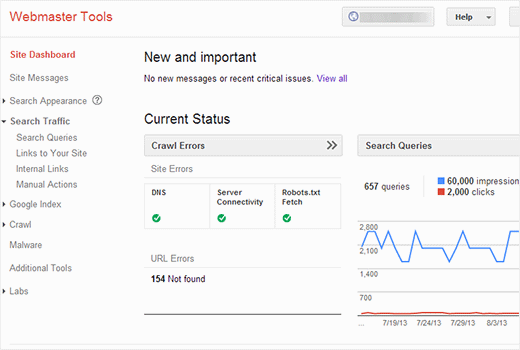
hom page of Google webmaster tools.
We can track following attributes with Google Webmaster Tools.
  • Search Appearance: It shows hoe to rich snippet works structured data, HTML improvements, AMP [Accelerated Mobile Pages] and much more.
  • Search Traffic: Search analytics, links to your site, backlinks, internal links, international targets and much more.
  • Google Index: It is a process to add web pages into Google search ie., index stats, block resources [Robots.txt] and remove URLs.
  • Crawl: It is a technique to scan the source code of your website ie., crawl errors and stats, site-maps submission, Robot.txt tester, fetch as google and much more.
  • Security Issues.

Google Analytics is a statics tool which focus the website as search engine & Google Search Console is a tracking tool which shows how Google sees your website as a search engine.

Click here to discover: Google Analytics & Google Webmaster Tools

Bing: The Search Engine

bing the search engine
Homepage of Bing

Bing is a web search engine which is designed and maintained by Microsoft. It is launched by Microsoft CEO Steve Ballmer on 1 June 2009. It is written in ASP.NET. It’s available in 40 languages. It also provides videos, images, maps, and other services like Google. Bing homepage features an image and video that changes daily. The name Bing was memorable, short and easy to spell chosen through focus group and Microsoft and the name has similarity to the word “Bingo” which means something caught was found.

Bing Webmaster Tools

bing webmaster tools

Bing webmaster tool is similar to the Google webmaster tools. It helps webmasters to add their websites. It is a free service that offers tools for webmasters to troubleshoot the crawling and indexing of their website, sitemap, creation, submission, website stats, consolidation of content submission, new content and community resources.

It’s very easy to get started with Bing. The following are the steps that can be referred to get your website indexed in Bing.

  1. Search and select “Bing webmaster tool” in Google search box.
  2. Create a Microsoft account.
  3. Login into the Blogger.
  4. Copy the URL of your blog spot such as https://ayshaseo.blogspot.com/.
  5. Paste it in “My site” box.
  6. Click on Add button.
  7. If no sitemap has been generated yet for your website just add a sitemap. After entering your site address add “/sitemap.xml”.And click on Add-on button.
  8. Choose meta tag verification for easy verification.
  9. Copy the Meta tag and paste it in theme Blogger and also paste in above closing of head tag.
  10. Click Verify.
  11. Go to the dashboard and select “diagnostics and tools” and click on “fetch as bingbot”
  12. Enter the URL to your website in the given box and give to fetch.

Hence we can add our blog to Bing webmaster tools and each of our posts can be crawled and indexed.

WordPress Vs Blogger

A small description about wordpress and blogger.

A Blogger and WordPress both are the software or services use to publish your content like article/ post on the internet as a blog. The blogging platform is a content management system.

What’s the best blogging platform?

Blogger

blogger.com

Blogger was found in 1999 by Pyra Labs and gained by Google in 2003. By 2006 every blogger account held on Google’s server, making the platform a lot more genuine. Google arranges your blog on their blogger platform with a default Blogspot domain.

Getting start with Blogger

Creating your blog on blogger you will need a Google account if you don’t then have one.

  • Enter a name for your blog.
  • Choose a blog address (URL)- Blogger confirms only if the chosen address is available.
  • choose a theme to your blog – There is handful of templates displayed as you create your blog and you can also browse more and customize your blog later.

Now your blog is successfully created in Blogger and its a time to explore by blogging.

What we like about Blogger

  • It is very simple to start.
  • It is easy to manage and use.
  • There is no installation issues because it is hosted by Google.
  • There is also no worries about software updates.
  • There is option to monetize with Adsense and promote with Adwords.

What we don’t like about Blogger

  • Social sharing is geared towards Google+ rather other networks.
  • Google can suspend your blog at anytime.

WordPress

wordpress.com

WordPress is a freemium blog service that launched in 2005 by Matt Mullenweg and Mike Little. It is written in a PHP language. It is an open source. 

Getting Start With WordPress

  • It is easy to start WordPress.com , if you have your account you can create your site with three steps:
  • Select the type of site you want – Blog, Website, Portfolio or online store (It is flexible).
  • Select a theme
  • Choose an address- you can choose free , use your registered domain if you have already bought one or buy one from wordpress.com.

What we like about WordPress.com

  • It very simple to use.
  • It is easy to use and manage.
  • There is no installation issues because it is hosted by WordPress.
  • There is no worries about software updates.
  • It has more social media sharing options than blogger. 

What we don’t like about WordPress.com

  • If they find you are violating their terms and services of WordPress.com, they  can suspend or delete your account.
  • To use third party themes and plugins you have to pay high premium.

I have included both flavors of WordPress and Blogger. There is a great blogging platform for you to mull over.

Which is the Blogging platform is right for you?

Blogging
Let get start…….!

Google Feedburner

Google Feedburner

what is Feedburner?

Feedburner is a free online service owned by Google, which tracks the people who subscribe to your blog and that allows you to automatically send email updates from your blog. Feedburner is a tool that generates a great feed statics of your blog. Feedburner provides services to bloggers and other feed publishers.

Benefits Of Feedburner

Here are the some reasons why people like Feedburner.

  • The users are updated each time a new blog goes live.
  • It will promote blog popularity and trust.
  • The email subscription widget is easy to setup and free to use.
  • It helps to track subscribers and provides customized email services.

Registration Of Feedburner:

  • Paste your blog address in the text box.
  • There is an option to tick podcaster, if your website gives videos and photo etc then the site is podcaster and select it if you need.
  • click on “next” button.
  • It will show identify feed source and select WordPress tutorial hub and click on “next button”.
  • Finally, you reach Feedburner stats. Here tick on “click-through” and want more click on “next” and finally Feedburner account is successfully created.

An email subscription widget that can be easily add in the sidebar of the blog.  Blogger can see how many people are following their blog.

 Email subscription:

  • signup or login to the feedburner.google.com
  • click the “publicize” option.
  • click “email subscription” from the left side of Feedburner account and “Activate”.

Plugin Email subscription To Your Blog:

  • Open the blogger and copy the code feedburner site.
  • Go to blogger layout and select” add widget”.
  • Then click on” HTML/java script”.
  • Paste the copied link in the content portion.
  • Click on “save arrangements”.

Successfully added email subscription option on you website.